

Your work desktop, anywhere.
Dropeen gives you a separate desktop on your own PC, and you open it from any browser, on your phone or a laptop. It keeps running when you close the tab. Pick up where you left off.
Windows 10 or 11. Already set up? Sign in.
How it works
Set it up once, then open it from anywhere
-
Install Dropeen on your PC
One download. It sets up the desktop for you and keeps itself up to date.
-
Pair it with your account
Sign in with your email, no password. Your desktop gets its own link, like yourname.dropeen.com.
-
Open your link anywhere
On your phone, a laptop, any browser. Nothing to install there. Sign in and you're at your desktop.
Made for work
A familiar desktop that stays where you left it
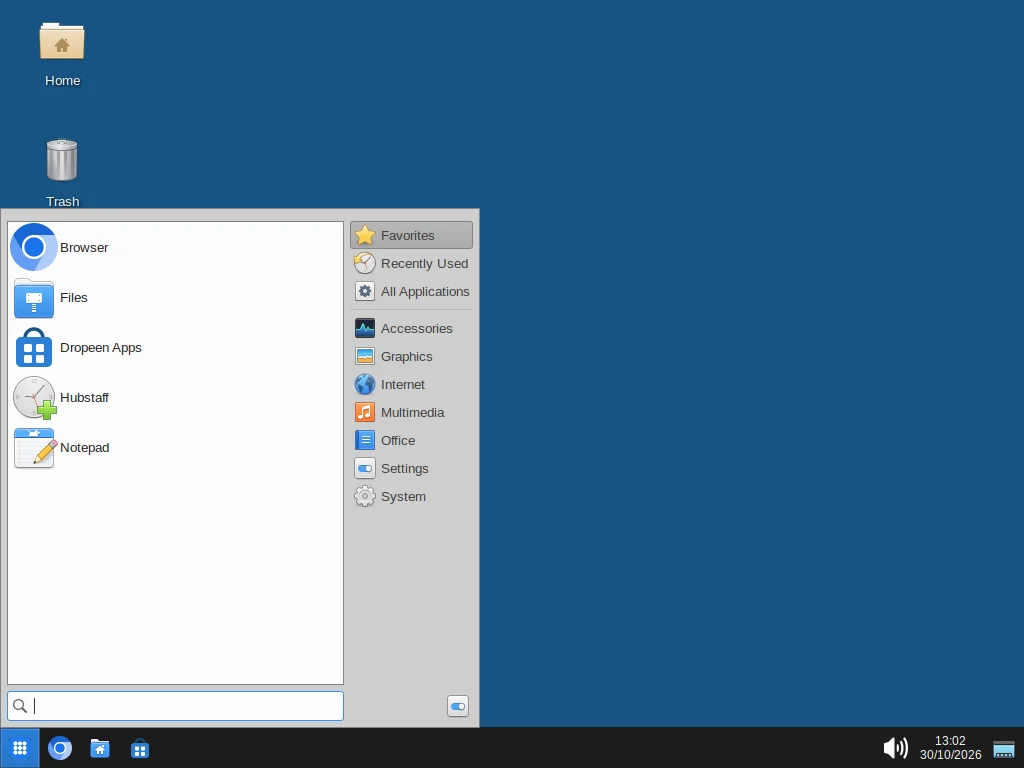
It looks and works the way you expect: a start menu, a taskbar, a browser and your files.
A browser and your work apps
Work in the browser, run time trackers like Hubstaff, and add apps from Dropeen Apps: other browsers, email, chat and meetings.
Keeps running
Close the tab or lose signal and your desktop carries on. Open the link again and everything is as you left it.
Runs on your own PC
The desktop runs at home on your computer and its internet connection, not on a rented server.
Light on data
The picture adapts to your connection, so it stays usable on mobile data.
Safe by design
Your desktop, and nobody else's
Dropeen is built so that opening your desktop from anywhere doesn't open up your PC.
- Kept apart from your PC. The desktop runs in its own sealed space. It can't see your files, your other programs or the devices on your home network.
- Sign-in for every visit. Your link only opens for you, after you sign in. Remove someone's access and they're cut off within a minute.
- Nothing recorded. We never record or store what's on your screen or what you type.
- Signed updates. Dropeen updates itself, and only installs updates signed by us.
Connections
Fast where you are
When your network allows, your browser connects straight to your PC for the quickest response. When it doesn't, the connection goes through Dropeen's relay. More relay regions are coming, starting with West Africa.
Pricing
Free for everyone during the beta
These are the plans we expect to offer after the beta. Prices aren't final, and you won't be charged without choosing a plan.
Free
$0
- 1 desktop
- 10 hours a month
- Nearest region
Plus
$6 / month, planned
- 3 desktops
- 100 hours a month
- All regions, with priority
- Choose your link name
Pro
$15 / month, planned
- 10 desktops
- 400 hours a month
- All regions, with priority
- No idle timeout
Questions
Good to know
What do I need?
A PC with Windows 10 (version 2004 or later) or Windows 11, with virtualization switched on (it is on most PCs), and about 5 GB of free disk space. Setup takes one administrator prompt and sometimes a restart. Dropeen also runs on macOS and Linux with Docker installed.
Can I use it from my phone?
Yes. Open your link in your phone's browser and sign in. A keyboard helps for long typing.
What happens when my PC is off?
Your desktop needs your PC to be on and Dropeen to be running. While Dropeen runs, it keeps your PC from going to sleep. If the PC is off, your link says the desktop isn't online.
Can someone else use my desktop?
You can invite people you trust by email, and remove them at any time. Check the rules of any work platform you use first: many don't allow someone else to work on your account.
What do you collect?
Your email, your desktop's name, how many hours you stream, and diagnostics about connection quality and errors, so we can fix problems. Never your screen, what you type or the sites you visit. You can turn diagnostics off in the app. Details are in our privacy policy.
What does it cost?
Nothing during the beta. After it, there will be a free plan and paid plans; see pricing.
Take your desktop with you
Install Dropeen on your PC, pair it with your account, and your desktop is a link away.
Download for Windows